


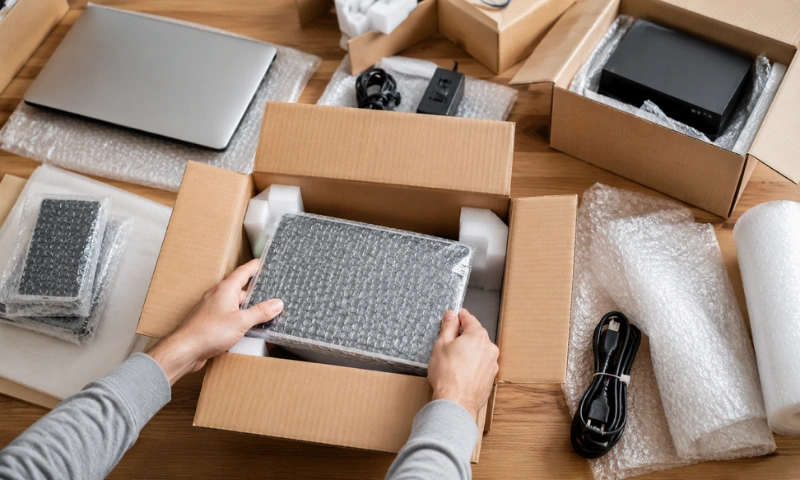
Moving electronics requires a little extra care. TVs, computers, gaming consoles, speakers, and other devices can be fragile and expensive, so poor packing can lead to scratches, cracked screens, or internal damage. Taking the right steps before moving day can help keep your valuable devices protected.
Whether you are moving across Auckland or to another part of New Zealand, proper preparation can make the process much easier. In this guide, we’ll cover how to pack electronics safely during a move, including simple tips for wrapping, boxing, labelling, and transporting your devices.
Why Is Proper Packing Important for Electronics?
Electronics can be fragile and expensive, so they need extra care during a move. Bumps, pressure, moisture, or poor handling can damage screens, cables, and internal components.
Proper packing helps:
- Protect screens from cracks and scratches
- Reduce the risk of damage during transport
- Keep cables and accessories organised
- Prevent devices from moving inside boxes
- Make unpacking easier at your new home
- Protect valuable electronics during the move
Spending a little extra time packing your electronics properly can help you avoid unnecessary repairs or replacements.
Best Ways to Pack Electronics Safely During Your Move

Packing electronics properly can help prevent damage and make unpacking much easier. Focus on protecting your devices, keeping small accessories organised, and making fragile boxes easy to identify.
1. Back Up Your Important Data
Before you start packing your electronics, take a few minutes to back up any important files stored on your devices. Moving involves handling, transportation and unpacking, so having a backup gives you extra protection if a device is damaged or misplaced.
Make sure you back up important information from:
- Laptops and computers: Save work files, documents and personal photos.
- Phones and tablets: Check that your photos, contacts and other important data are synced.
- External hard drives: Create another copy of important files before moving them.
- Gaming consoles: Back up saved games to cloud storage where available.
- Smart devices: Save important settings or information that may be difficult to restore.
Keep Your Backup Safe
Do not put your only backup inside a moving box. Keep external drives containing important information with you during the move whenever possible.
2. Organise Cables and Accessories
Cables, chargers and remote controls can easily get tangled or separated during a move. Keeping them organised with the correct device makes unpacking and setting up your electronics much easier.
- Coil cables neatly: Secure each cable with a Velcro strap or twist tie to prevent tangling.
- Label each cable: Mark cables according to the device they belong to.
- Keep accessories together: Pack chargers, remotes, adapters and controllers with the relevant device.
- Use labelled bags: Store smaller cables and accessories in separate bags marked “TV Cables,” “Computer Cables,” or “Router Cables.”
- Take photos first: Photograph complicated cable connections before unplugging them so you know where everything goes later.
This makes setting up your electronics much easier when you arrive at your new home.
3. Use Original Packaging If Possible
If you still have the original packaging for your electronics, use it whenever possible. These boxes are made specifically for each device and usually include protective inserts that help keep the item secure during handling and transportation.
Why Original Packaging Is a Good Choice
Original packaging provides a better fit than many standard moving boxes. It can help protect electronics from movement, bumps and pressure during the move.
- Better Fit: Original boxes are made to match the size and shape of the device, helping keep it securely in place.
- Extra Padding: Foam inserts and protective supports provide cushioning around delicate parts.
- Less Movement: A close-fitting box reduces the amount of movement inside during transportation.
- Easy Packing: The box and inserts are already designed for the device, making packing simpler and quicker.
4. Wrap and Protect Each Device
Once your electronics are ready to pack, each device should be wrapped separately. Good protection helps reduce the risk of scratches, dents, cracked screens and damage from movement during transportation.
How to Protect Different Electronics
- TVs and Monitors: Wrap the screen with foam or bubble wrap and give extra protection to the corners. Use the original box or a suitable TV box if available. Keep screens upright during transportation.
- Computers and Laptops: Shut down computers completely and disconnect all cables. Wrap desktop towers with protective material and place them in a sturdy box with enough padding. Keep laptops with you when possible.
- Gaming Consoles: Turn off the console, remove any discs and wrap the device separately. Keep controllers, cables and other accessories together in a labelled bag.
- Printers and Scanners: Remove ink or toner cartridges where appropriate and secure loose parts before wrapping. Place the device upright in a strong, well-padded box.
- Speakers and Sound Systems: Wrap speakers individually and add extra padding to larger or heavier equipment. Keep cables and accessories organised and labelled.
- Routers and Smart Devices: Pack the device, power adapter and cables together in a labelled box. This makes it easier to find and reconnect your internet and smart home devices after the move.
5. Label Electronics Boxes Clearly
Once your electronics are packed, clear labelling helps protect them during loading, transportation and unloading. It also makes unpacking much easier because you can quickly see what each box contains and where it belongs.
What to Include on the Labels
- Mark the box as fragile: Use “FRAGILE” or “HANDLE WITH CARE” so the box is easy to identify.
- Show the correct position: Add “THIS SIDE UP” or arrows when the device needs to remain upright.
- Name the contents: Write the main item inside, such as “TV,” “Computer,” “Printer,” or “Gaming Console.”
- Add the room name: Include the destination, such as “Living Room,” “Bedroom,” or “Home Office.”
- Keep labels visible: Place labels on more than one side of the box so they can be seen easily during handling.
- Avoid vague labels: Instead of writing only “Electronics,” mention the actual contents to make unpacking easier.
Why Clear Labelling Matters
Electronics often need more careful handling than regular household boxes. A clear label lets movers quickly identify fragile items and understand how they should be positioned.
It also saves time when you arrive at your new home. Instead of opening several boxes to find a TV remote, computer cable or router, you can quickly identify the right box and start setting up your electronics.
6. Keep Sensitive Electronics With You
Not every electronic device needs to go inside the moving truck. Small, valuable or sensitive devices are often better kept with you during the move. This gives you more control over how they are handled and helps protect them from unnecessary damage.
Why Keep Certain Electronics With You?
- Protect valuable devices: Laptops, tablets, cameras, gaming devices and other small electronics can be expensive to replace. Keeping them with you reduces the risk of loss or damage during transportation.
- Avoid extreme conditions: Electronics can be sensitive to heat, cold and moisture. Keeping delicate devices with you can help reduce their exposure to harsh conditions during the move.
- Protect personal information: Laptops, phones, tablets and storage drives may contain private photos, work files, passwords and other sensitive information. Keeping these devices with you gives you better control over your personal data.
- Keep important devices accessible: You may need your phone, laptop or other devices as soon as you arrive at your new home. Keeping them with you means they are easy to access instead of being x`packed away in the moving truck.
For larger electronics that need to be transported with the rest of your belongings, make sure they are properly wrapped, securely packed and clearly labelled before moving day.
Common Mistakes to Avoid When Packing Electronics

Even with good packing materials, a few simple mistakes can put your electronics at risk. Avoid these common problems to make your move safer:
- Packing devices without padding: Electronics should not sit loose inside a box. Always add enough cushioning to prevent movement.
- Leaving cables unlabelled: Mixed-up cables can make setting up your electronics frustrating after the move.
- Packing screens incorrectly: TVs and monitors need extra protection and should be kept upright during transportation.
- Skipping data backups: If a device is damaged, a backup can help protect your important files and photos.
- Overloading boxes: Avoid putting too many heavy electronics in one box. Use strong boxes and spread the weight evenly.
- Forgetting fragile labels: Clearly mark boxes containing electronics so they can be handled with extra care.
- Packing valuable devices unnecessarily: Keep smaller, high-value electronics such as laptops, phones and external drives with you when possible.
- Rushing the packing process: Give yourself enough time to disconnect, wrap, label and check each device properly.
A little preparation can make a big difference when it comes to protecting your electronics during a move.
When Should You Hire Professional Movers?
Packing electronics can take extra time and care, especially when you have large, fragile or expensive devices. Professional movers can make the process easier by helping with careful packing, safe handling and secure transportation.
Professional moving support can be especially useful when you are moving:
- Large TVs and monitors
- Heavy computers or office equipment
- Multiple electronic devices
- Large speakers or sound systems
- Fragile or high-value equipment
- Electronics that require careful loading and unloading
If you are unsure how to pack a delicate device or do not have the right packing materials, getting professional help can give you extra peace of mind.
Conclusion
Packing your electronics properly can help protect them from scratches, cracks and other damage during a move. Start by backing up important data, organising cables and using the right packing materials for each device.
Remember to use original packaging when available, wrap fragile electronics carefully and label each box clearly. For valuable or sensitive devices, keeping them with you can provide extra protection.
With the right preparation and careful handling, you can make moving your electronics safer, easier and less stressful. Planning your next move in Auckland? Contact Us today to discuss your moving needs and get professional help with your move.